Geometry Evaluation
This section describes geometry representation and discusses how to evaluate geometry using the VB API.
Geometry Traversal
•  A simple rectangular face has one contour and four edges.
•  A contour will traverse a boundary so that the part face is always on the right-hand side (RHS). For an external contour the direction of traversal is clockwise. For an internal contour the direction of traversal is counterclockwise.
•  If a part is extruded from a sketch that has a U-shaped cross section there will be separate surfaces at each leg of the U-channel.
•  If a part is extruded from a sketch that has a square-shaped cross section, and a slot feature is then cut into the part to make it look like a U-channel, there will be one surface across the legs of the U-channel. The original surface of the part is represented as one surface with a cut through it.
Geometry Terms
Following are definitions for some geometric terms:
•  Surface—An ideal geometric representation, that is, an infinite plane.
•  Face—A trimmed surface. A face has one or more contours.
•  Contour—A closed loop on a face. A contour consists of multiple edges. A contour can belong to one face only.
•  Edge—The boundary of a trimmed surface.
An edge of a solid is the intersection of two surfaces. The edge belongs to those two surfaces and to two contours. An edge of a datum surface can be either the intersection of two datum surfaces or the external boundary of the surface.
If the edge is the intersection of two datum surfaces it will belong to those two surfaces and to two contours. If the edge is the external boundary of the datum surface it will belong to that surface alone and to a single contour.
Traversing the Geometry of a Solid Block
Methods Introduced:
  • IpfcModelItemOwner.ListItems()
  • IpfcSurface.ListContours()
  • IpfcContour.ListElements()
  • To traverse the geometry, follow these steps:
    1. Starting at the top-level model, use IpfcModelItemOwner.ListItems() with an argument of ModelItemType.ITEM_SURFACE.
    2. Use IpfcSurface.ListContours() to list the contours contained in a specified surface.
    3. Use IpfcContour.ListElements() to list the edges contained in the contour.
    Curves and Edges
    Datum curves, surface edges, and solid edges are represented in the same way in the VB API. You can get edges through geometry traversal or get a list of edges using the methods presented in the section ModelItem.
    The t Parameter
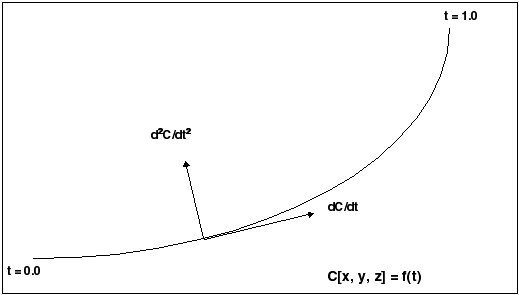
    The geometry of each edge or curve is represented as a set of three parametric equations that represent the values of x, y, and z as functions of an independent parameter, t. The t parameter varies from 0.0 at the start of the curve to 1.0 at the end of it.
    The following figure illustrates curve and edge parameterization.
    Image
    Curve and Edge Types
    Solid edges and datum curves can be any of the following types:
    •  LINE—A straight line represented by the interface IpfcLine.
    •  ARC—A circular curve represented by the interface IpfcArc.
    •  SPLINE—A nonuniform cubic spline, represented by the interface IpfcSpline.
    •  B-SPLINE—A nonuniform rational B-spline curve or edge, represented by the interface IpfcBSpline.
    •  COMPOSITE CURVE—A combination of two or more curves, represented by the interface IpfcCompositeCurve. This is used for datum curves only.
    See the section Geometry Representations for the parameterization of each curve type. To determine what type of curve a IpfcEdge or IpfcCurve object represents, use the Java instanceof operator.
    Because each curve class inherits from IpfcGeomCurve, you can use all the evaluation methods in IpfcGeomCurve on any edge or curve.
    The following curve types are not used in solid geometry and are reserved for future expansion:
    •  CIRCLE (IpfcCircle)
    •  ELLIPSE (IpfcEllipse)
    •  POLYGON (IpfcPolygon)
    •  ARROW (IpfcArrow)
    •  TEXT (IpfcText)
    Evaluation of Curves and Edges
    Methods Introduced:
  • IpfcGeomCurve.Eval3DData()
  • IpfcGeomCurve.EvalFromLength()
  • IpfcGeomCurve.EvalParameter()
  • IpfcGeomCurve.EvalLength()
  • IpfcGeomCurve.EvalLengthBetween()
  • The methods in IpfcGeomCurve provide information about any curve or edge.
    The method IpfcGeomCurve.Eval3DData() returns a IpfcCurveXYZData object with information on the point represented by the input parameter t. The method IpfcGeomCurve.EvalFromLength() returns a similar object with information on the point that is a specified distance from the starting point.
    The method IpfcGeomCurve.EvalParameter() returns the t parameter that represents the input IpfcPoint3D object.
    Both IpfcGeomCurve.EvalLength() and IpfcGeomCurve.EvalLengthBetween() return numerical values for the length of the curve or edge.
    Solid Edge Geometry
    Methods and Properties Introduced:
  • IpfcEdge.Surface1
  • IpfcEdge.Surface2
  • IpfcEdge.Edge1
  • IpfcEdge.Edge2
  • IpfcEdge.EvalUV()
  • IpfcEdge.GetDirection()
  • Note
    The methods in the interface IpfcEdge provide information only for solid or surface edges.
    The properties IpfcEdge.Surface1 and Edge.Surface2 return the surfaces bounded by this edge. The properties IpfcEdge.Edge1 and IpfcEdge.Edge2 return the next edges in the two contours that contain this edge.
    The method IpfcEdge.EvalUV() evaluates geometry information based on the UV parameters of one of the bounding surfaces.
    The method IpfcEdge.GetDirection() returns a positive 1 if the edge is parameterized in the same direction as the containing contour, and –1 if the edge is parameterized opposite to the containing contour.
    Curve Descriptors
    A curve descriptor is a data object that describes the geometry of a curve or edge. A curve descriptor describes the geometry of a curve without being a part of a specific model.
    Methods Introduced:
  • IpfcGeomCurve.GetCurveDescriptor()
  • IpfcGeomCurve.GetNURBSRepresentation()
  • Note
    To get geometric information for an edge, access the IpfcCurveDescriptor object for one edge using IpfcGeomCurve.GetCurveDescriptor().
    The method IpfcGeomCurve.GetCurveDescriptor() returns a curve’s geometry as a data object.
    The method IpfcGeomCurve.GetNURBSRepresentation() returns a Non-Uniform Rational B-Spline Representation of a curve.
    Contours
    Methods and Properties Introduced:
  • IpfcSurface.ListContours()
  • IpfcContour.InternalTraversal
  • IpfcContour.FindContainingContour()
  • IpfcContour.EvalArea()
  • IpfcContour.EvalOutline()
  • IpfcContour.VerifyUV()
  • Contours are a series of edges that completely bound a surface. A contour is not a IpfcModelItem. You cannot get contours using the methods that get different types of IpfcModelItem. Use the method IpfcSurface.ListContours() to get contours from their containing surfaces.
    The property IpfcContour.InternalTraversal returns a EpfcContourTraversal enumerated type that identifies whether a given contour is on the outside or inside of a containing surface.
    Use the method IpfcContour.FindContainingContour() to find the contour that entirely encloses the specified contour.
    The method IpfcContour.EvalArea() provides the area enclosed by the contour.
    The method IpfcContour.EvalOutline() returns the points that make up the bounding rectangle of the contour.
    Use the method IpfcContour.VerifyUV() to determine whether the given IpfcUVParams argument lies inside the contour, on the boundary, or outside the contour.
    Surfaces
    Using the VB API you access datum and solid surfaces in the same way.
    UV Parameterization
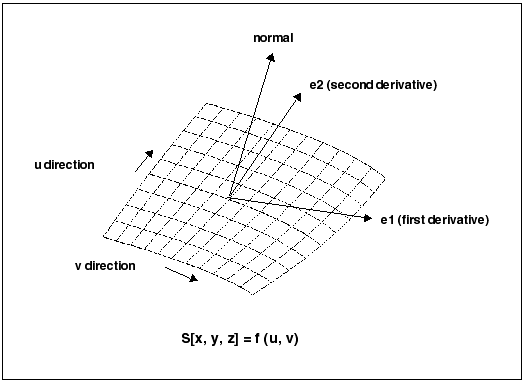
    A surface in Creo Parametric is described as a series of parametric equations where two parameters, u and v, determine the x, y, and z coordinates. Unlike the edge parameter, t, these parameters need not start at 0.0, nor are they limited to 1.0.
    The figure on the following page illustrates surface parameterization.
    Image
    Surface Types
    Surfaces within Creo Parametric can be any of the following types:
    •  PLANE—A planar surface represented by the interfaceIpfcPlane.
    •  CYLINDER—A cylindrical surface represented by the interfaceIpfcCylinder.
    •  CONE—A conic surface region represented by the interfaceIpfcCone.
    •  TORUS—A toroidal surface region represented by the interface IpfcTorus.
    •  REVOLVED SURFACE—Generated by revolving a curve about an axis. This is represented by the interface IpfcRevSurface.
    •  RULED SURFACE—Generated by interpolating linearly between two curve entities. This is represented by the interface IpfcRuledSurface.
    •  TABULATED CYLINDER—Generated by extruding a curve linearly. This is represented by the interfaceIpfcTabulatedCylinder.
    •  COONS PATCH—A coons patch is used to blend surfaces together. It is represented by the interface IpfcCoonsPatch.
    •  FILLET SURFACE—A filleted surface is found where a round or fillet is placed on a curved edge or an edge with a non-consistant arc radii. On a straight edge a cylinder is used to represent a fillet. This is represented by the class interface IpfcFilletedSurface.
    •  SPLINE SURFACE— A nonuniform bicubic spline surface that passes through a grid with tangent vectors given at each point. This is represented by the interface IpfcSplineSurface.
    •  NURBS SURFACE—A NURBS surface is defined by basic functions (in u and v), expandable arrays of knots, weights, and control points. This is represented by the class interface IpfcNURBSSurface.
    •  CYLINDRICAL SPLINE SURFACE— A cylindrical spline surface is a nonuniform bicubic spline surface that passes through a grid with tangent vectors given at each point. This is represented by the interface IpfcCylindricalSplineSurface.
    To determine which type of surface a IpfcSurface object represents, access the surface type using IpfcSurface.GetSurfaceType().
    Surface Information
    Methods Introduced:
  • IpfcSurface.GetSurfaceType()
  • IpfcSurface.GetXYZExtents()
  • IpfcSurface.GetUVExtents()
  • IpfcSurface.GetOrientation()
  • The method IpfcSurface.GetSurfaceType() returns the type of the surface using the enumerated data type EpfcSurfaceType and the valid values are:
    •  EpfcSURFACE_PLANE
    •  EpfcSURFACE_CYLINDER
    •  EpfcSURFACE_CONE
    •  EpfcSURFACE_TORUS
    •  EpfcSURFACE_RULED
    •  EpfcSURFACE_REVOLVED
    •  EpfcSURFACE_TABULATED_CYLINDER
    •  EpfcSURFACE_FILLET
    •  EpfcSURFACE_COONS_PATCH
    •  EpfcSURFACE_SPLINE
    •  EpfcSURFACE_NURBS
    •  EpfcSURFACE_CYLINDRICAL_SPLINE
    •  EpfcSURFACE_FOREIGN
    •  EpfcSURFACE_SPL2DER
    The method IpfcSurface::GetXYZExtents() returns the XYZ points at the corners of the surface.
    The method IpfcSurface::GetUVExtents() returns the UV parameters at the corners of the surface.
    The method IpfcSurface::GetOrientation() returns the orientation of the surface using the enumerated data type EpfcSurfaceOrientation and the valid values are:
    •  EpfcSURFACEORIENT_NONE—Surface that does not need orientation. For example, a solid surface needs orientation and therefore cannot be specified.
    •  EpfcSURFACEORIENT_OUTWARD—Surface that has oriented outward away from the solid model. du X dv points outward.
    •  EpfcSURFACEORIENT_INWARD—Surface that has oriented inward toward the solid model. du X dv points inward.
    Evaluation of Surfaces
    Surface methods allow you to use multiple surface information to calculate, evaluate, determine, and examine surface functions and problems.
    Methods and Properties Introduced:
  • IpfcSurface.OwnerQuilt
  • IpfcSurface.EvalClosestPoint()
  • IpfcSurface.EvalClosestPointOnSurface()
  • IpfcSurface.Eval3DData()
  • IpfcSurface.EvalParameters()
  • IpfcSurface.EvalArea()
  • IpfcSurface.EvalDiameter()
  • IpfcSurface.EvalPrincipalCurv()
  • IpfcSurface.VerifyUV()
  • IpfcSurface.EvalMaximum()
  • IpfcSurface.EvalMinimum()
  • IpfcSurface.ListSameSurfaces
  • The property IpfcSurface.OwnerQuilt returns the Quilt object that contains the datum surface.
    The method IpfcSurface.EvalClosestPoint() projects a three-dimensional point onto the surface. Use the method IpfcSurface.EvalClosestPointOnSurface() to determine whether the specified three-dimensional point is on the surface, within the accuracy of the part. If it is, the method returns the point that is exactly on the surface. Otherwise the method returns null.
    The method IpfcSurface.Eval3DData() returns a IpfcSurfXYZData object that contains information about the surface at the specified u and v parameters. The method IpfcSurface.EvalParameters() returns the u and v parameters that correspond to the specified three-dimensional point.
    The method IpfcSurface.EvalArea() returns the area of the surface, whereas IpfcSurface.EvalDiameter() returns the diameter of the surface. If the diameter varies the optional IpfcUVParams argument identifies where the diameter should be evaluated.
    The method IpfcSurface.EvalPrincipalCurv() returns a IpfcCurvatureData object with information regarding the curvature of the surface at the specified u and v parameters.
    Use the method IpfcSurface.VerifyUV() to determine whether the IpfcUVParams are actually within the boundary of the surface.
    The methods IpfcSurface.EvalMaximum() and IpfcSurface.EvalMinimum() return the three-dimensional point on the surface that is the furthest in the direction of (or away from) the specified vector.
    The method IpfcSurface.ListSameSurfaces() identifies other surfaces that are tangent and connect to the given surface.
    Surface Descriptors
    A surface descriptor is a data object that describes the shape and geometry of a specified surface. A surface descriptor allows you to describe a surface in 3D without an owner ID.
    Methods Introduced:
  • IpfcSurface.GetSurfaceDescriptor()
  • IpfcSurface.GetNURBSRepresentation()
  • The method IpfcSurface.GetSurfaceDescriptor() returns a surfaces geometry as a data object.
    The method IpfcSurface.GetNURBSRepresentation() returns a Non-Uniform Rational B-Spline Representation of a surface.
    Axes, Coordinate Systems, and Points
    Coordinate axes, datum points, and coordinate systems are all model items. Use the methods that return IpfcModelItems to get one of these geometry objects. Refer to the section ModelItem for additional information.
    Evaluation of ModelItems
    Properties Introduced:
  • IpfcAxis.Surf
  • IpfcCoordSystem.CoordSys
  • IpfcPoint.Point
  • The property IpfcAxis.Surf returns the revolved surface that uses the axis.
    The property IpfcCoordSystem.CoordSys returns the IpfcTransform3D object (which includes the origin and x-, y-, and z- axes) that defines the coordinate system.
    The property IpfcPoint.Point returns the xyz coordinates of the datum point.
    Interference
    Creo Parametric assemblies can contain interferences between components when constraint by certain rules defined by the user. The IpfcInterference module allows the user to detect and analyze any interferences within the assembly. The analysis of this functionality should be looked at from two standpoints: global and selection based analysis.
    Methods and Properties Introduced:
  • CMpfcInterference.CreateGlobalEvaluator()
  • IpfcGlobalEvaluator.ComputeGlobalInterference()
  • IpfcGlobalEvaluator.Assem
  • IpfcGlobalEvaluator.Assem
  • IpfcGlobalInterference.Volume
  • IpfcGlobalInterference.SelParts
  • To compute all the interferences within an Assembly one has to call CMpfcInterference.CreateGlobalEvaluator() with a IpfcAssembly object as an argument. This call returns aIpfcGlobalEvaluator object.
    The property IpfcGlobalEvaluator.Assem accesses the assembly to be evaluated.
    The method IpfcGlobalEvaluator.ComputeGlobalInterference() determines the set of all the interferences within the assembly.
    This method will return a sequence of IpfcGlobalInterference objects or null if there are no interfering parts. Each object contains a pair of intersecting parts and an object representing the interference volume, which can be extracted by using IpfcGlobalInterference.SelParts and IpfcGlobalInterference.Volume respectively.
    Analyzing Interference Information
    Methods and Properties Introduced:
  • CCpfcSelectionPair.Create()
  • CCpfcInterference.CreateSelectionEvaluator()
  • IpfcSelectionEvaluator.Selections
  • IpfcSelectionEvaluator.ComputeInterference()
  • IpfcSelectionEvaluator.ComputeClearance()
  • IpfcSelectionEvaluator.ComputeNearestCriticalDistance()
  • The method CCpfcSelectionPair.Create() creates a IpfcSelectionPair object using two IpfcSelection objects as arguments.
    A return from this method will serve as an argument to CMpfcInterference.CreateSelectionEvaluator(), which will provide a way to determine the interference data between the two selections.
    IpfcSelectionEvaluator.Selections will extract and set the object to be evaluated.
    IpfcSelectionEvaluator.ComputeInterference() determines the interfering information about the provided selections. This method will return the IpfcInterferenceVolume object or null if the selections do no interfere.
    IpfcSelectionEvaluator.ComputeClearance() computes the clearance data for the two selection. This method returns a IpfcClearanceData object, which can be used to obtain and set clearance distance, nearest points between selections, and a boolean IsInterferening variable.
    IpfcSelectionEvaluator.ComputeNearestCriticalDistance() finds a critical point of the distance function between two selections.
    This method returns a IpfcCriticalDistanceData object, which is used to determine and set critical points, surface parameters, and critical distance between points.
    Analyzing Interference Volume
    Methods and Properties Introduced:
  • IpfcInterferenceVolume.ComputeVolume()
  • IpfcInterferenceVolume.Highlight()
  • IpfcInterferenceVolume.Boundaries
  • The method IpfcInterferenceVolume.ComputeVolume() will calculate a value for interfering volume.
    The method IpfcInterferenceVolume.Highlight() will highlight the interfering volume with the color provided in the argument to the function.
    The property IpfcInterferenceVolume.Boundaries will return a set of boundary surface descriptors for the interference volume.
    Example Code
    The sample code in the file pfcGeometryExamples.vb located at <creo_vbapi_loadpoint>/vbapi_examples finds the interference in an assembly, highlights the interfering surfaces, and highlights calculates the interference volume.
    This application finds the interference in an assembly, highlights the interfering surfaces, and highlights calculates the interference volume.