Structure of Assemblies and Assembly Objects
The object IpfcAssembly is an instance of IpfcSolid. The IpfcAssembly object can therefore be used as input to any of the IpfcSolid and IpfcModel methods applicable to assemblies. However assemblies do not contain solid geometry items. The only geometry in the assembly
is datums (points, planes, axes, coordinate systems, curves, and surfaces). Therefore solid assembly features such as holes
and slots will not contain active surfaces or edges in the assembly model.
The solid geometry of an assembly is contained in its components. A component is a feature of type IpfcComponentFeat, which is a reference to a part or another assembly, and a set of parametric constraints for determining its geometrical
location within the parent assembly.
Assembly features that are solid, such as holes and slots, and therefore affect the solid geometry of parts in the assembly
hierarchy, do not themselves contain the geometry items that describe those modifications. These items are always contained
in the parts whose geometry is modified, within local features created for that purpose.
The important functions for assemblies are those that operate on the components of an assembly. The object IpfcComponentFeat, which is an instance of IpfcFeature is defined for that purpose. Each assembly component is treated as a variety of feature, and the integer identifier of the
component is also the feature identifier.
An assembly can contain a hierarchy of assemblies and parts at many levels, in which some assemblies and parts may appear
more than once. To identify the role of any database item in the context of the root assembly, it is not sufficient to have
the integer identifier of the item and the handle to its owning part or assembly, as would be provided by its IpfcFeature description.
It is also necessary to give the full path of the assembly-component references down from the root assembly to the part or
assembly that owns the database item. This is the purpose of the object IpfcComponentPath, which is used as the input to the VB API assembly functions.
The following figure shows an assembly hierarchy with two examples of the contents of a IpfcComponentPath object.
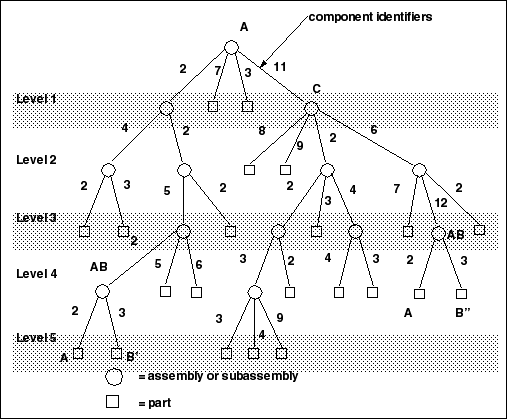
In the assembly shown in the figure, subassembly C is component identifier 11 within assembly A, Part B is component identifier
3 within assembly AB, and so on. The subassembly AB occurs twice. To refer to the two occurrences of part B, use the following:
(?)Component B’               Component B"
ComponentIds.Item(0) = 2   ComponentIds.Item(1) = 11
ComponentIds.Item(1) = 2   ComponentIds.Item(2) = 6
ComponentIds.Item(2) = 5   ComponentIds.Item(3) = 12
ComponentIds.Item(3) = 2   ComponentIds.Item(4) = 3
ComponentIds.Item(4) = 3
The object IpfcComponentPath is one of the main portions of the IpfcSelection object.
Assembly Components
Methods and Properties Introduced:
| |
| |
| |
| |
| |
| |
| |
| |
| |
| |
| |
The property IpfcComponentFeat.IsBulkitem identifies whether an assembly component is a bulk item. A bulk item is a non-geometric assembly feature that should appear
in an assembly bill of materials.
The property IpfcComponentFeat.GetIsSubstitute returns a true value if the component is substituted, else it returns a false. When you substitute a component in a simplified
representation, you temporarily exclude the substituted component and superimpose the substituting component in its place.
The property IpfcComponentFeat.CompType returns the type of the assembly component. The component type identifies the purpose of the component in a manufacturing
assembly.
The property IpfcComponentFeat.ModelDescr returns the model descriptor of the component part or subassembly.
Note
From Pro/ENGINEER Wildfire 4.0 onwards, the property IpfcComponentFeat.ModelDescr throws an exception IpfcXtoolkitCantOpen if called on an assembly component whose immediate generic is not in session. Handle this exception and typecast the assembly
component as IpfcSolid, which in turn can be typecast as IpfcFamilyMember, and use the method IpfcFamilyMember.GetImmediateGenericInfo() to get the model descriptor of the immediate generic model. If you wish to switch off this behavior and continue to run legacy
applications in the pre-Wildfire 4.0 mode, set the configuration option retrieve_instance_dependencies to instance_and_generic_deps.
The property IpfcComponentFeat.IsPlaced determines whether the component is placed.
Note
Once a component is constrained or packaged, it cannot be made unplaced again.
A component of an assembly that is either partially constrained or unconstrained is known as a packaged component. Use the
property IpfcComponentFeat.IsPackaged to determine if the specified component is packaged.
The property IpfcComponentFeat.IsUnderconstrained determines if the specified component is underconstrained, that is, it possesses some constraints but is not fully constrained.
The property IpfcComponentFeat.IsFrozen determines if the specified component is frozen. The frozen component behaves similar to the packaged component and does
not follow the constraints that you specify.
The property IpfcComponentFeat.Position retrieves the component’s initial position before constraints and movements have been applied. If the component is packaged
this position is the same as the constraint’s actual position. This property modifies the assembly component data but does
not regenerate the assembly component. To regenerate the component, use the method IpfcComponentFeat.Regenerate.
The method IpfcComponentFeat.CopyTemplateContents() copies the template model into the model of the specified component.
The method IpfcCompontentFeat.CreateReplaceOp() creates a replacement operation used to swap a component automatically with a related component. The replacement operation
can be used as an argument to IpfcSolid.ExecuteFeatureOps.
Example Code: Replacing Instances
The sample code in the file pfcAssembliesExamples.vb located at <creo_vbapi_loadpoint>/vbapi_examples contains a single static utility method. This method takes an assembly for an argument. It searches through the assembly
for all components that are instances of the model "bolt". It then replaces all such occurrences with a different instance
of bolt.
Component Path Information
Methods and Properties Introduced:
| |
| |
| |
| |
| |
| |
The property IpfcComponentPath.Root returns the assembly at the head of the component path object.
The property IpfcComponentPath.ComponentIds returns the sequence of ids which is the path to the particular component.
The property IpfcComponentPath.Leaf returns the solid model at the end of the component path.
The method IpfcComponentPath.Transform() returns the coordinate system transformation between the assembly and the particular component. It has an option to provide
the transformation from bottom to top, or from top to bottom. This method describes the current position and the orientation
of the assembly component in the root assembly.
The method IpfcComponentPath.SetTransform() applies a temporary transformation to the assembly component, similar to the transformation that takes place in an exploded
state. The transformation will only be applied if the assembly is using DynamicPositioning.
The method IpfcComponentPath.IsVisible() identifies if a particular component is visible in any simplified representation.