| • | Create a VB.NET form capable of starting or connecting to Creo Parametric non-graphically, accepting user inputs and driving model modifications or deliverables. |
| • | Create a VB.NET application that may or may not have its own User Interface (UI). The application should be able to establish one or more Creo Parametric UI or event listeners in session, and process those events using VB.NET code. |
| • | API calls to Creo Parametric should be made only from a single thread. Other threads can process non Creo Parametric data and set data to be seen by the Creo Parametric thread, but only one thread can communicate with Creo Parametric. |
| • | Only one active connection can be made to a single Creo Parametric session at one time. |
| 1. | Click Start > Settings > Control Panel. |
| 2. | Click System. The System Properties windows opens. |
| 3. | In the Advanced tab, click the Environment Variables button. |
| 4. | Add PRO_COMM_MSG_EXE to System variables. |
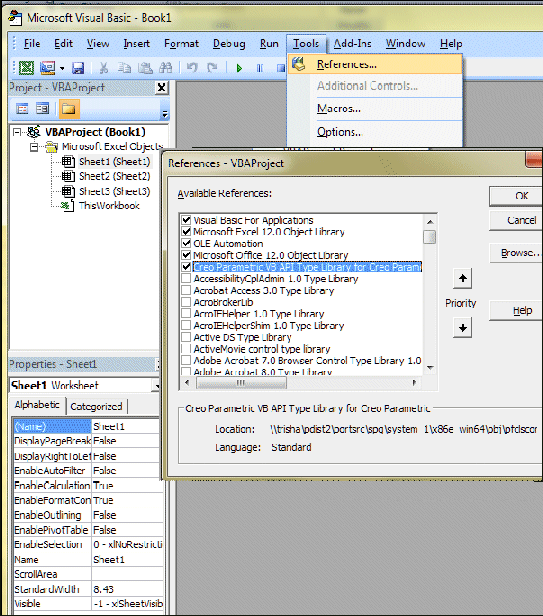
| 1. | Click . |
| 2. | Check the box for Creo Parametric VB API Type Library for Creo Parametric as shown in the following figure.![]() |
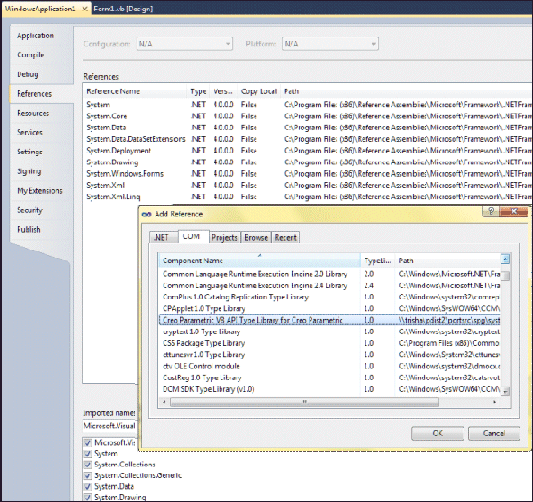
| 1. | Click . |
| 2. | Select Creo Parametric VB API Type Library for Creo Parametric as shown in the following figure.![]() |
| • | Creo Parametric-Related Classes—Contain unique methods and properties that are directly related to the functions in Creo Parametric. See the section Creo Parametric-Related Classes for more information. |
| • | Compact Data Classes—Classes containing data needed as arguments to some VB methods. See the section, Compact Data Classes, for additional information. |
| • | Union Classes—Classes with a potential to contain multiple types of values. See the section Unions for additional information. |
| • | Sequence Classes—Expandable arrays of objects or primitive data types. See the section Sequences for more information. |
| • | Array Classes—Arrays that are limited to a certain size. See the section Arrays for more information. |
| • | Enumeration Classes—Enumerated types, which list a restricted and valid set of options for the property. See the section Enumeration Classes for more information. |
| • | Module-Level Classes—Contain static methods used to initialize certain VB objects. See the section Module-Level Classes for more information. |
| • | ActionListener Classes—Enable you to specify code that will run only if certain events in Creo Parametric take place. See the section Action Listeners for more information. |
Dim window as pfcls.IpfcWindow; window.Activate(); ‘ The window has not yet ‘ been initialized. Repaint(); ‘ There is no invoking object.
Dim window As Pfcls.IpfcWindow
Dim session as pfcls.IpfcSession
Dim asyncConnection as pfcls.IpfcAsyncConnection
Dim Casync as New pfcls.CCpfcAsyncConnection
asyncConnection = Casync.Connect (DBNull.Value, DBNull.Value, DBNull.Value, DBNull.Value)
session = asyncConnection.Session;
window = session.CurrentWindow; ' You have initialized
' the window object.
window.Activate()
window.Repaint()| • | IpfcObject |
| • | IpfcChild |
| • | IpfcActionSource |
| • | IpfcModelItem |
| • | IpfcFeature |
| • | IpfcComponentFeat |
| 1. | You can code the method call directly even though it is not available in Intellisense.Dim componentFeat as pfcls.IpfcComponentFeat
MsgBox ("Feature number: " & componentFeat.Number);Note
This works in VB.NET but is likely to result in a compilation error in VBA.
|
| 2. | You can create another object of the appropriate type and assign it the object handle, and then call the required method.Dim componentFeat as pfcls.IpfcComponentFeat
Dim feat as pfcls.IpfcFeature
feat = componentFeat
MsgBox ("Feature number: " & feat.Number); |
'Class object, owns Create()
Dim tableCellCreate As New pfcls.CCpfcTableCell
Dim tableCell As pfcls.IpfcTableCell
Set tableCell = tableCellCreate.Create(1, 1) Interface IpfcParamValue
--------------------------------------------------------
Description
This class describes the value of the parameter.
--------------------------------------------------------
Union Discriminant
Property discr as IpfcParamValueType [readonly]
Returns the union discriminant value.
--------------------------------------------------------
Property Summary
Property BoolValue as Boolean
If the parameter type is PARAM_BOOLEAN, this is a Boolean value.
Property DoubleValue as Double
If the parameter type is PARAM_DOUBLE, this is a double value.
Property IntValue as Long
If the parameter type is PARAM_INTEGER, this is an integer value.
Property NoteId as Long
If the parameter type is PARAM_NOTE, this is a note identifier.
Property StringValue as String
If the parameter type is PARAM_STRING, this is a string value.Dim model as IpfcModel
model = models (0)| • | Append()—Adds a new item to the end of the array |
| • | Clear()—Removes all items from the array |
| • | Insert()—Inserts a new item at any location of the array |
| • | InsertSeq()—Inserts the contents of a sequence of items at any location of the array |
| • | Set()—Assigns one item in the array to the input item |
| • | Remove()—Removes a range of items from the array |
Dim point as IpfcPoint3D Dim matrix as IpfcMatrix3D MsgBox (“Y value of point: “ & point.Item (1)) MsgBox (“(2, 2) value of matrix: “ & matrix (2, 2))
Dim type as EpfcFeatureType
type = EpfcFeatureType.EpfcFEATTYPE_HOLE| • | EpfcPARAM_INTEGER—A value in the EpfcParamValueType enumeration class that is used to indicate that a parameter stores an integer value. |
| • | EpfcITEM_FEATURE—An value in the EpfcModelItemType enumeration class that is used to indicate that a model item is a feature. |
Dim mSelect as New CMpfcSelectPrivate Class ModelEventListener
Implements IpfcModelEventActionListener
Implements ICIPClientObject
Implements IpfcActionListener
Public Function GetClientInterfaceName() As String _
Implements ICIPClientObject.GetClientInterfaceName
GetClientInterfaceName = "IpfcModelEventActionListener"
End Function
'======================================================================
'Function : OnAfterModelCopy
'Purpose : This method is executed after successfully
' copying a model.
'======================================================================
Public Sub OnAfterModelCopy(ByVal _FromMdl As
pfcls.IpfcModelDescriptor, ByVal _ToMdl As
pfcls.IpfcModelDescriptor) Implements
pfcls.IpfcModelEventActionListener.OnAfterModelCopy
'Method Body
End Sub
'======================================================================
'Function : OnAfterModelRename
'Purpose : This method is executed after successfully
' renaming a model.
'======================================================================
Public Sub OnAfterModelRename(ByVal _FromMdl As
pfcls.IpfcModelDescriptor, ByVal _ToMdl As
pfcls.IpfcModelDescriptor) Implements
pfcls.IpfcModelEventActionListener.OnAfterModelRename
'Method Body
End Sub
Public Sub OnAfterModelCopyAll(ByVal _FromMdl As
pfcls.IpfcModelDescriptor, ByVal _ToMdl As
pfcls.IpfcModelDescriptor) Implements
pfcls.IpfcModelEventActionListener.OnAfterModelCopyAll
End Sub
Public Sub OnAfterModelDelete(ByVal _Descr As
pfcls.IpfcModelDescriptor) Implements
pfcls.IpfcModelEventActionListener.OnAfterModelDelete
End Sub
Public Sub OnAfterModelErase(ByVal _Descr As
pfcls.IpfcModelDescriptor) Implements
pfcls.IpfcModelEventActionListener.OnAfterModelErase
End Sub
End Class| 1. | Use the method CCpfcAsyncConnection.Connect() to connect to an existing session of Creo Parametric.Dim connection As IpfcAsyncConnection
Dim classAsyncConnection As New CCpfcAsyncConnection
connection = classAsyncConnection.Connect (DBNull.Value, DBNull.Value, DBNull.Value, DBNull.Value) |
| 2. | Get a handle to the session of Creo Parametricfor the current active connection:Dim session As IpfcBaseSession
ession = connection.Session |
| 3. | Get the models that are loaded in the session:Dim models As IpfcModels
models = session.ListModels() |
| 4. | Get the handle to the first model in the list:Dim model As IpfcModel
model = models[0] |
| 5. | Get the feature model items in each model:Dim items As IpfcModelItems
items = model.ListItems (EpfcModelItemType.EpfcITEM_FEATURE) |
| 6. | Filter out the features of type hole:if (feature.FeatType = EpfcFeatureType.EpfcFEATTYPE_HOLE) then |
| 7. | Get the subitems in each feature that are axes:Dim axes As IpfcModelItems
axes = feature.ListSubItems (EpfcModelItemType.EpfcITEM_AXIS) |
IpfcModelItems ListItems (Type as IpfcModelItemType [optional]);Function GetModel (Name as String, Type as IpfcModelType) as IpfcModel [optional]|
Parent
|
Child
|
|---|---|
|
IpfcSession
|
IpfcModel
|
|
IpfcSession
|
IpfcWindow
|
|
IpfcModel
|
IpfcModelItem
|
|
IpfcSolid
|
IpfcFeature
|
|
IpfcModel
|
IpfcParameter
|
|
IpfcModel
|
IpfcExternalDataAccess
|
|
IpfcPart
|
IpfcMaterial
|
|
IpfcModel
|
IpfcView
|
|
IpfcModel2D
|
IpfcView2D
|
|
IpfcSolid
|
IpfcXSection
|
|
IpfcSession
|
IpfcDll (Creo TOOLKIT)
|
|
IpfcSession
|
IpfcJLinkApplication ()
|
Dim ls As New pfcls.CCpfcAsyncConnection
Dim aC As pfcls.IpfcAsyncConnection
Dim cId As New pfcls.CCpfcConnectionId
Dim id As pfcls.IpfcConnectionId
Dim session As pfcls.IpfcBaseSession
Dim model As pfcls.IpfcModel
Set id = cId.Create(connectionId)
Set aC = ls.ConnectById(id, DBNull.Value, DBNull.Value)
Set session = aC.Session
Set model = session.CurrentModel
Try
session.SetConfigOption("no_way", "no_how")
Catch ex As Exception
MsgBox(ex.Message) 'Will show IpfcXToolkitNotFound
End Try|
Exception
|
Purpose
|
|---|---|
|
IpfcXBadExternalData
|
An attempt to read contents of an external data object that has been terminated.
|
|
IpfcXBadGetArgValue
|
Indicates attempt to read the wrong type of data from the IpfcArgValue union.
|
|
IpfcXBadGetExternalData
|
Indicates attempt to read the wrong type of data from the IpfcExternalData union.
|
|
IpfcXBadGetParamValue
|
Indicates attempt to read the wrong type of data from the IpfcParamValue union.
|
|
IpfcXBadOutlineExcludeType
|
Indicates an invalid type of item was passed to the outline calculation method.
|
|
IpfcXCancelProEAction
|
This exception type will not be thrown by VB API methods, but you may instantiate and throw this from certain ActionListener methods to cancel the corresponding action in
Creo Parametric.
|
|
IpfcXCannotAccess
|
The contents of a VB API object cannot be accessed in this situation.
|
|
IpfcXEmptyString
|
An empty string was passed to a method that does not accept this type of input.
|
|
IpfcXInvalidEnumValue
|
Indicates an invalid value for a specified enumeration class.
|
|
IpfcXInvalidFileName
|
Indicates a file name passed to a method was incorrectly structured.
|
|
IpfcXInvalidFileType
|
Indicates a model descriptor contained an invalid file type for a requested operation.
|
|
IpfcXInvalidModelItem
|
Indicates that the item requested to be used is no longer usable (for example, it may have been deleted).
|
|
IpfcXInvalidSelection
|
Indicates that the IpfcSelection passed is invalid or is missing a needed piece of information. For example, its component path, drawing view, or parameters.
|
|
IpfcXJLinkApplicationException
|
Contains the details when an attempt to call code in an external application failed due to an exception.
|
|
IpfcXJLinkApplicationInactive
|
Unable to operate on the requested IpfcJLinkApplication object because it has been shut down.
|
|
IpfcXJLinkTaskNotFound
|
Indicates that the task with the given name could not be found and run.
|
|
IpfcXModelNotInSession
|
Indicates that the model is no longer in session; it may have been erased or deleted.
|
|
IpfcXNegativeNumber
|
Numeric argument was negative.
|
|
IpfcXNumberTooLarge
|
Numeric argument was too large.
|
|
IpfcXProEWasNotConnected
|
The Creo Parametric session is not available so the operation failed.
|
|
IpfcXSequenceTooLong
|
Sequence argument was too long.
|
|
IpfcXStringTooLong
|
String argument was too long.
|
|
IpfcXUnimplemented
|
Indicates unimplemented method.
|
|
IpfcXUnknownModelExtension
|
Indicates that a file extension does not match a known Creo Parametric model type.
|
|
IpfcXToolkitError Child Class
|
Creo TOOLKIT Error
|
#
|
|---|---|---|
|
IpfcXToolkitGeneralError
|
PRO_TK_GENERAL_ERROR
|
-1
|
|
IpfcXToolkitBadInputs
|
PRO_TK_BAD_INPUTS
|
-2
|
|
IpfcXToolkitUserAbort
|
PRO_TK_USER_ABORT
|
-3
|
|
IpfcXToolkitNotFound
|
PRO_TK_E_NOT_FOUND
|
-4
|
|
IpfcXToolkitFound
|
PRO_TK_E_FOUND
|
-5
|
|
IpfcXToolkitLineTooLong
|
PRO_TK_LINE_TOO_LONG
|
-6
|
|
IpfcXToolkitContinue
|
PRO_TK_CONTINUE
|
-7
|
|
IpfcXToolkitBadContext
|
PRO_TK_BAD_CONTEXT
|
-8
|
|
IpfcXToolkitNotImplemented
|
PRO_TK_NOT_IMPLEMENTED
|
-9
|
|
IpfcXToolkitOutOfMemory
|
PRO_TK_OUT_OF_MEMORY
|
-10
|
|
IpfcXToolkitCommError
|
PRO_TK_COMM_ERROR
|
-11
|
|
IpfcXToolkitNoChange
|
PRO_TK_NO_CHANGE
|
-12
|
|
IpfcXToolkitSuppressedParents
|
PRO_TK_SUPP_PARENTS
|
-13
|
|
IpfcXToolkitPickAbove
|
PRO_TK_PICK_ABOVE
|
-14
|
|
IpfcXToolkitInvalidDir
|
PRO_TK_INVALID_DIR
|
-15
|
|
IpfcXToolkitInvalidFile
|
PRO_TK_INVALID_FILE
|
-16
|
|
IpfcXToolkitCantWrite
|
PRO_TK_CANT_WRITE
|
-17
|
|
IpfcXToolkitInvalidType
|
PRO_TK_INVALID_TYPE
|
-18
|
|
IpfcXToolkitInvalidPtr
|
PRO_TK_INVALID_PTR
|
-19
|
|
IpfcXToolkitUnavailableSection
|
PRO_TK_UNAV_SEC
|
-20
|
|
IpfcXToolkitInvalidMatrix
|
PRO_TK_INVALID_MATRIX
|
-21
|
|
IpfcXToolkitInvalidName
|
PRO_TK_INVALID_NAME
|
-22
|
|
IpfcXToolkitNotExist
|
PRO_TK_NOT_EXIST
|
-23
|
|
IpfcXToolkitCantOpen
|
PRO_TK_CANT_OPEN
|
-24
|
|
IpfcXToolkitAbort
|
PRO_TK_ABORT
|
-25
|
|
IpfcXToolkitNotValid
|
PRO_TK_NOT_VALID
|
-26
|
|
IpfcXToolkitInvalidItem
|
PRO_TK_INVALID_ITEM
|
-27
|
|
IpfcXToolkitMsgNotFound
|
PRO_TK_MSG_NOT_FOUND
|
-28
|
|
IpfcXToolkitMsgNoTrans
|
PRO_TK_MSG_NO_TRANS
|
-29
|
|
XToolkitMsgFmtError
|
PRO_TK_MSG_FMT_ERROR
|
-30
|
|
IpfcXToolkitMsgUserQuit
|
PRO_TK_MSG_USER_QUIT
|
-31
|
|
IpfcXToolkitMsgTooLong
|
PRO_TK_MSG_TOO_LONG
|
-32
|
|
IpfcXToolkitCantAccess
|
PRO_TK_CANT_ACCESS
|
-33
|
|
IpfcXToolkitObsoleteFunc
|
PRO_TK_OBSOLETE_FUNC
|
-34
|
|
IpfcXToolkitNoCoordSystem
|
PRO_TK_NO_COORD_SYSTEM
|
-35
|
|
IpfcXToolkitAmbiguous
|
PRO_TK_E_AMBIGUOUS
|
-36
|
|
IpfcXToolkitDeadLock
|
PRO_TK_E_DEADLOCK
|
-37
|
|
IpfcXToolkitBusy
|
PRO_TK_E_BUSY
|
-38
|
|
IpfcXToolkitInUse
|
PRO_TK_E_IN_USE
|
-39
|
|
IpfcXToolkitNoLicense
|
PRO_TK_NO_LICENSE
|
-40
|
|
IpfcXToolkitBsplUnsuitableDegree
|
PRO_TK_BSPL_UNSUITABLE_DEGREE
|
-41
|
|
IpfcXToolkitBsplNonStdEndKnots
|
PRO_TK_BSPL_NON_STD_END_KNOTS
|
-42
|
|
IpfcXToolkitBsplMultiInnerKnots
|
PRO_TK_BSPL_MULTI_INNER_KNOTS
|
-43
|
|
IpfcXToolkitBadSrfCrv
|
PRO_TK_BAD_SRF_CRV
|
-44
|
|
IpfcXToolkitEmpty
|
PRO_TK_EMPTY
|
-45
|
|
IpfcXToolkitBadDimAttach
|
PRO_TK_BAD_DIM_ATTACH
|
-46
|
|
IpfcXToolkitNotDisplayed
|
PRO_TK_NOT_DISPLAYED
|
-47
|
|
IpfcXToolkitCantModify
|
PRO_TK_CANT_MODIFY
|
-48
|
|
IpfcXToolkitCheckoutConflict
|
PRO_TK_CHECKOUT_CONFLICT
|
-49
|
|
IpfcXToolkitCreateViewBadSheet
|
PRO_TK_CRE_VIEW_BAD_SHEET
|
-50
|
|
IpfcXToolkitCreateViewBadModel
|
PRO_TK_CRE_VIEW_BAD_MODEL
|
-51
|
|
IpfcXToolkitCreateViewBadParent
|
PRO_TK_CRE_VIEW_BAD_PARENT
|
-52
|
|
IpfcXToolkitCreateViewBadType
|
PRO_TK_CRE_VIEW_BAD_TYPE
|
-53
|
|
IpfcXToolkitCreateViewBadExplode
|
PRO_TK_CRE_VIEW_BAD_EXPLODE
|
-54
|
|
IpfcXToolkitUnattachedFeats
|
PRO_TK_UNATTACHED_FEATS
|
-55
|
|
IpfcXToolkitRegenerateAgain
|
PRO_TK_REGEN_AGAIN
|
-56
|
|
IpfcXToolkitDrawingCreateErrors
|
PRO_TK_DWGCREATE_ERRORS
|
-57
|
|
IpfcXToolkitUnsupported
|
PRO_TK_UNSUPPORTED
|
-58
|
|
IpfcXToolkitNoPermission
|
PRO_TK_NO_PERMISSION
|
-59
|
|
IpfcXToolkitAuthenticationFailure
|
PRO_TK_AUTHENTICATION_FAILURE
|
-60
|
|
IpfcXToolkitMultibodyUnsupported
|
PRO_TK_MULTIBODY_UNSUPPORTED
|
-69
|
|
IpfcXToolkitAppNoLicense
|
PRO_TK_APP_NO_LICENSE
|
-92
|
|
IpfcXToolkitAppExcessCallbacks
|
PRO_TK_APP_XS_CALLBACKS
|
-93
|
|
IpfcXToolkitAppStartupFailed
|
PRO_TK_APP_STARTUP_FAIL
|
-94
|
|
IpfcXToolkitAppInitializationFailed
|
PRO_TK_APP_INIT_FAIL
|
-95
|
|
IpfcXToolkitAppVersionMismatch
|
PRO_TK_APP_VERSION_MISMATCH
|
-96
|
|
IpfcXToolkitAppCommunicationFailure
|
PRO_TK_APP_COMM_FAILURE
|
-97
|
|
IpfcXToolkitAppNewVersion
|
PRO_TK_APP_NEW_VERSION
|
-98
|