Overview of the VB API
This section provides an overview of the VB APIs.
Introduction
The VB API for Creo Parametric is an asynchronous application that can be used from any COM-enabled application including Visual Basic.NET (VB.NET), Visual Basic for Applications (VBA), and external Internet Explorer instances using scripting.
Visual Basic.NET Applications
You can use the VB API for Creo Parametric to:
•  Create a VB.NET form capable of starting or connecting to Creo Parametric non-graphically, accepting user inputs and driving model modifications or deliverables.
•  Create a VB.NET application that may or may not have its own User Interface (UI). The application should be able to establish one or more Creo Parametric UI or event listeners in session, and process those events using VB.NET code.
Visual Basic for Applications
The VB APIs provide support for accessing Creo Parametric from Visual Basic-enabled products such as Microsoft Excel, Microsoft Word, or Microsoft Access. The COM interface is provided to control Creo Parametric asynchronously and use the PFC API's to access its properties.
You can also access data from OLE objects embedded in Creo Parametric. The OLE objects can include VB code that can be used to drive the model from which the object is contained.
Limitations of the VB API
The asynchronous COM server has the following limitations:
•  API calls to Creo Parametric should be made only from a single thread. Other threads can process non Creo Parametric data and set data to be seen by the Creo Parametric thread, but only one thread can communicate with Creo Parametric.
•  Only one active connection can be made to a single Creo Parametric session at one time.
Getting Started
Setting Up a VB Application
For your application to communicate with Creo Parametric, you must set the PRO_COMM_MSG_EXE environment variable to the full path of the executable, pro_comm_msg.exe. Typically, the path to the executable is <creo_loadpoint>\<version>\Common Files\<machine type>\obj\pro_comm_msg.exe, where machine type is i486_nt for 32-bit Windows and x86e_win64 for 64-bit Windows installations.
Set PRO_COMM_MSG_EXE as:
1. Click Start > Settings > Control Panel.
2. Click System. The System Properties windows opens.
3. In the Advanced tab, click the Environment Variables button.
4. Add PRO_COMM_MSG_EXE to System variables.
Registering the COM Server
To register the COM server, run the vb_api_register.bat file located at <creo_loadpoint>/Parametric/bin.
To unregister the COM server, run the vb_api_unregister.bat file located at <creo_loadpoint>/Parametric/bin.
After the COM server is registered with the system, whenever an application tries to access the types contained in this server the server starts automatically. By default, Windows starts services such as pfclscom.exe in the Windows system directory (c:\winnt\system_32). Because the server will also start new sessions of Creo Parametric from the process working directory, you may want to control the server run directory. You can configure the server to start in a specific directory by setting the system environment variable PFCLS_START_DIR to any existing directory on your computer.
Setting Project References for the VB API
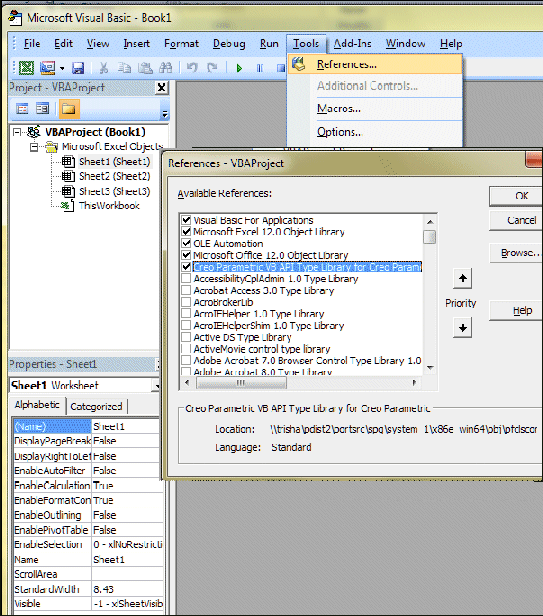
Set the reference to Creo Parametric VB API Type Library for Creo Parametric through your project. In the VBA environment set this reference as follows:
1. Click Tools  References.
2. Check the box for Creo Parametric VB API Type Library for Creo Parametric as shown in the following figure.
Image
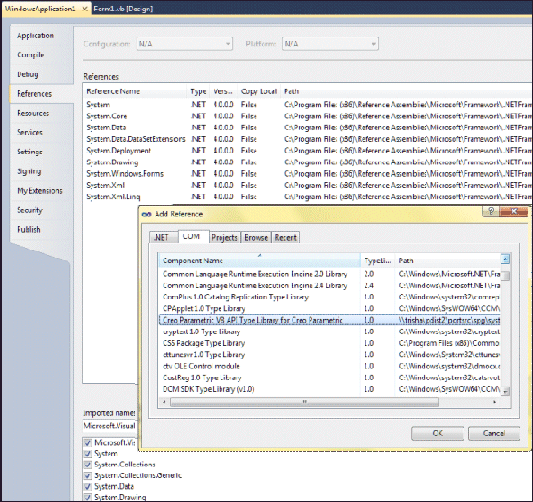
In the VB.NET environment, set this reference as follows:
1. Click Project  Properties  Add Reference  COM.
2. Select Creo Parametric VB API Type Library for Creo Parametric as shown in the following figure.
Image
Object Types
The VB API is made up of a number of classes in many modules. The following are the main class types:
•  Creo Parametric-Related Classes—Contain unique methods and properties that are directly related to the functions in Creo Parametric. See the section Creo Parametric-Related Classes for more information.
•  Compact Data Classes—Classes containing data needed as arguments to some VB methods. See the section, Compact Data Classes, for additional information.
•  Union Classes—Classes with a potential to contain multiple types of values. See the section Unions for additional information.
•  Sequence Classes—Expandable arrays of objects or primitive data types. See the section Sequences for more information.
•  Array Classes—Arrays that are limited to a certain size. See the section Arrays for more information.
•  Enumeration Classes—Enumerated types, which list a restricted and valid set of options for the property. See the section Enumeration Classes for more information.
•  Module-Level Classes—Contain static methods used to initialize certain VB objects. See the section Module-Level Classes for more information.
•  ActionListener Classes—Enable you to specify code that will run only if certain events in Creo Parametric take place. See the section Action Listeners for more information.
Each class shares specific rules regarding initialization, attributes, methods, inheritance, or exceptions. The following sections describe these classes in detail.
Creo Parametric - Related Classes
The Creo Parametric-Related Classes contain methods that directly manipulate objects in Creo Parametric. Examples of these objects include models, features, and parameters.
Initialization
You cannot construct one of these objects using the keyword New. Instead, you should obtain the handle to a Creo Parametric-related object by creating or listing that object with a method on the parent object in the hierarchy.
For example, IpfcBaseSession.CurrentModel returns a IpfcModel object set to the current model and IpfcParameterOwner.CreateParam() returns a newly created parameter object for manipulation.
Properties
Properties within Creo Parametric-related objects are directly accessible. Some attributes that have been designated as read-only can be accessed but not modified by the VB API.
Methods
You must invoke methods from the object in question and first initialize that object. For example, the following calls are illegal:
Dim window as pfcls.IpfcWindow;
window.Activate();          The window has not yet 
                            been initialized.
Repaint();                  There is no invoking object.
The following calls are legal:
Dim window As Pfcls.IpfcWindow
Dim session as pfcls.IpfcSession
Dim asyncConnection as pfcls.IpfcAsyncConnection
Dim Casync as New pfcls.CCpfcAsyncConnection

asyncConnection = Casync.Connect (DBNull.Value, DBNull.Value, DBNull.Value, DBNull.Value)
session = asyncConnection.Session;
window = session.CurrentWindow;     ' You have initialized
                                    ' the window object.
window.Activate()
window.Repaint()
Inheritance
Many Creo Parametric-related objects inherit methods from other interfaces. In VB.NET and VBA, you must have an object of the correct type for the compiler and IDE to resolve the methods you wish to call. For example, an IpfcComponentFeat object could use the methods and properties as follows:
•  IpfcObject
•  IpfcChild
•  IpfcActionSource
•  IpfcModelItem
•  IpfcFeature
•  IpfcComponentFeat
The following are the approaches to using an object’s inherited methods:
1. You can code the method call directly even though it is not available in Intellisense.
Dim componentFeat as pfcls.IpfcComponentFeat
MsgBox ("Feature number: " & componentFeat.Number);
Note
This works in VB.NET but is likely to result in a compilation error in VBA.
2. You can create another object of the appropriate type and assign it the object handle, and then call the required method.
Dim componentFeat as pfcls.IpfcComponentFeat
Dim feat as pfcls.IpfcFeature

feat = componentFeat
MsgBox ("Feature number: " & feat.Number);
Compact Data Classes
Compact data classes are data-only classes. They are used for arguments and return values for some VB API methods. They do not represent actual objects in Creo Parametric. Other than a difference in how they are initialized, compact data classes have similar requirements to Creo Parametric-related classes.
Initialization
You can create these compact data objects using a designated Create method which resides on the CC version of the compact class. You instantiate the CC class object with the keyword New.
For example,
'Class object, owns Create()
Dim tableCellCreate As New pfcls.CCpfcTableCell 
Dim tableCell As pfcls.IpfcTableCell
Set tableCell = tableCellCreate.Create(1, 1)
Unions
Unions are classes containing potentially several different value types. Every union has a discriminator property with the predefined name, discr. This property returns a value identifying the type of data that the union object holds. For each union member, a separate property is used to access the different data types. It is illegal to attempt to read any property except the one that matches the value returned from the discriminator. However, any property that switches the discriminator to the new value type can be modified.
The following is an example of a VB API union:
  Interface IpfcParamValue
--------------------------------------------------------
  Description 
  This class describes the value of the parameter. 
--------------------------------------------------------
  Union Discriminant 
  Property discr as IpfcParamValueType [readonly]  
  Returns the union discriminant value.
--------------------------------------------------------
  Property Summary 
  Property BoolValue as Boolean
   If the parameter type is PARAM_BOOLEAN, this is a Boolean value.
  Property DoubleValue as Double
   If the parameter type is PARAM_DOUBLE, this is a double value.
  Property IntValue as Long
   If the parameter type is PARAM_INTEGER, this is an integer value.
  Property NoteId as Long
   If the parameter type is PARAM_NOTE, this is a note identifier.
  Property StringValue as String
   If the parameter type is PARAM_STRING, this is a string value.
Sequences
Sequences are expandable arrays of primitive data types or objects in the VB API. All sequence classes have the same methods for adding to and accessing the array. Sequence classes are typically identified by a plural name, or the suffix seq.
Initialization
You can create instances of these classes directly by instantiating the appropriate class object:
Properties
The read-only Count attribute identifies how many members are currently in the sequence. You may also access members of the sequence using the Item property or directly:
Dim model as IpfcModel
model = models (0)
Methods
Sequence objects always contain the same methods. Use the following methods to access the contents of the sequence:
•  Append()—Adds a new item to the end of the array
•  Clear()—Removes all items from the array
•  Insert()—Inserts a new item at any location of the array
•  InsertSeq()—Inserts the contents of a sequence of items at any location of the array
•  Set()—Assigns one item in the array to the input item
•  Remove()—Removes a range of items from the array
Inheritance
Sequence classes do not inherit from any other VB API classes. Therefore, you cannot use sequence objects as arguments where any other type of VB API object is expected, including other types of sequences. For example, if you have a list of IpfcModelItems that happen to be features, you cannot use the sequence as if it were a sequence of IpfcFeatures.
To construct the array of features, you must insert each member of the IpfcModelItems list into the new IpfcFeatures list.
Arrays
Arrays are groups of primitive types or objects of a specified size. An array can be one- or two- dimensional. The online reference documentation indicates the exact size of each array class.
Initialization
You can create instances of these classes directly by instantiating the appropriate class object:
Properties
You may read members of the sequence using the Item property or directly as an array:
Dim point as IpfcPoint3D
Dim matrix as IpfcMatrix3D
MsgBox (Y value of point: & point.Item (1))
MsgBox ((2, 2) value of matrix: & matrix (2, 2))
Methods
Array objects contain only the Set method, which assigns one item in the array to the input item.
Enumeration Classes
In the VB API, an enumeration class defines a limited number of values that correspond to the members of the enumeration. Each value represents an appropriate type and may be accessed by name. In the EpfcFeatureType enumeration class, the value EpfcFEATTYPE_HOLE represents a Hole feature in Creo Parametric. Enumeration classes in the VB API generally have names of the form EpfcXYZType or EpfcXYZStatus.
Initialization
You can directly refer to instance of this class:
Dim type as EpfcFeatureType
type = EpfcFeatureType.EpfcFEATTYPE_HOLE
Attributes
An enumeration class is made up of constant integer properties. The names of these properties are all uppercase and describe what the attribute represents. For example:
•  EpfcPARAM_INTEGER—A value in the EpfcParamValueType enumeration class that is used to indicate that a parameter stores an integer value.
•  EpfcITEM_FEATURE—An value in the EpfcModelItemType enumeration class that is used to indicate that a model item is a feature.
An enumeration class always has an integer value named <type>_nil, which is one more than the highest acceptable numerical value for that enumeration class.
Module-Level Classes
Some modules in the VB API have one class that contains special functions used to create and access some of the other classes in the package. These module classes have the naming convention, CM+ the name of the module, for example CMpfcSelect.
Initialization
You can create instances of these classes directly by instantiating the appropriate class object:
Dim mSelect as New CMpfcSelect
Methods
Module-level classes contain only static methods used for initializing certain VB API objects.
Action Listeners
Action Listeners notify you of events in Creo Parametric. They are also the basis for customization of the Creo Parametric User Interface. ActionListeners are not supported from VBA.
Initialization
In VB.NET, you can create and assign an ActionListener class as follows.
Create a class implementing the listener in question. It should define all the inherited methods, even if you want to only execute code for a few of the listener methods. Those other methods should be implemented with an empty body.
The class should also implement the interface IpfcActionListener, which has no methods.
The class should also implement ICIPClientObject. This method defines the object type to the CIP code in the server. This method returns a String which is the name of the listener type interface, for example, IpfcSessionActionListener.
Private Class ModelEventListener
        Implements IpfcModelEventActionListener
        Implements ICIPClientObject
        Implements IpfcActionListener

        Public Function GetClientInterfaceName() As String _
            Implements ICIPClientObject.GetClientInterfaceName
            GetClientInterfaceName = "IpfcModelEventActionListener"
        End Function
'======================================================================
'Function   :   OnAfterModelCopy
'Purpose    :   This method is executed after successfully 
'               copying a model.
'======================================================================
        Public Sub OnAfterModelCopy(ByVal _FromMdl As 
            pfcls.IpfcModelDescriptor, ByVal _ToMdl As
            pfcls.IpfcModelDescriptor) Implements 
            pfcls.IpfcModelEventActionListener.OnAfterModelCopy
       'Method Body 
        End Sub
'======================================================================
'Function   :   OnAfterModelRename
'Purpose    :   This method is executed after successfully 
'               renaming a model.
'======================================================================
        Public Sub OnAfterModelRename(ByVal _FromMdl As 
            pfcls.IpfcModelDescriptor, ByVal _ToMdl As 
            pfcls.IpfcModelDescriptor) Implements 
            pfcls.IpfcModelEventActionListener.OnAfterModelRename

      'Method Body 

        End Sub

        Public Sub OnAfterModelCopyAll(ByVal _FromMdl As 
            pfcls.IpfcModelDescriptor, ByVal _ToMdl As 
            pfcls.IpfcModelDescriptor) Implements 
            pfcls.IpfcModelEventActionListener.OnAfterModelCopyAll

        End Sub

        Public Sub OnAfterModelDelete(ByVal _Descr As 
            pfcls.IpfcModelDescriptor) Implements 
            pfcls.IpfcModelEventActionListener.OnAfterModelDelete

        End Sub

        Public Sub OnAfterModelErase(ByVal _Descr As 
            pfcls.IpfcModelDescriptor) Implements 
            pfcls.IpfcModelEventActionListener.OnAfterModelErase

        End Sub

    End Class
Exceptions
Action listeners cause methods to be called outside of your application start and stop methods. Therefore, you must include exception-handling code inside the IpfcActionListener implementation if you want to respond to exceptions. In some methods called before an event, propagating a IpfcXCancelProEAction exception out of your method will cancel the impending event.
Programming Considerations
The items in this section introduce programming tips and techniques used for programming with the VB API.
Application Hierarchy
The rules of object orientation require a certain hierarchy of object creation when you start a VB application. The application must iterate down to the level of the object you want to access. For example, to list all the datum axes contained in the hole features in all models in session, do the following:
1. Use the method CCpfcAsyncConnection.Connect() to connect to an existing session of Creo Parametric.
Dim connection As IpfcAsyncConnection
Dim classAsyncConnection As New CCpfcAsyncConnection
connection = classAsyncConnection.Connect (DBNull.Value, DBNull.Value, DBNull.Value, DBNull.Value)
2. Get a handle to the session of Creo Parametricfor the current active connection:
Dim session As IpfcBaseSession
ession = connection.Session
3. Get the models that are loaded in the session:
Dim models As IpfcModels
models = session.ListModels()
4. Get the handle to the first model in the list:
Dim model As IpfcModel
model = models[0]
5. Get the feature model items in each model:
Dim items As IpfcModelItems
items = model.ListItems    (EpfcModelItemType.EpfcITEM_FEATURE)
6. Filter out the features of type hole:
if (feature.FeatType = EpfcFeatureType.EpfcFEATTYPE_HOLE) then
7. Get the subitems in each feature that are axes:
Dim axes As IpfcModelItems
axes = feature.ListSubItems (EpfcModelItemType.EpfcITEM_AXIS)
Optional Arguments and Tags
Many methods in the VB API are shown in the online documentation as having optional arguments.
For example, the IpfcModelItemOwner.ListItems() method takes an optional Type argument.
IpfcModelItems ListItems (Type as IpfcModelItemType [optional]);
In VB.Net, you can pass the keyword Nothing in place of any such optional argument. In VBA, use Null in place of any such optional argument. The VB API methods that take optional arguments provide default handling for Nothing parameters which is described in the online documentation.
Note
You can only pass Nothing in place of arguments that are shown in the documentation to be optional.
Optional Returns for the VB API Methods
Some methods in the VB API have an optional return. Usually these correspond to lookup methods that may or may not find an object to return. For example, the IpfcBaseSession.GetModel() method returns an optional model:
Function GetModel (Name as String, Type as IpfcModelType) as IpfcModel [optional]
The VB API might return Nothing in certain cases where these methods are called. You must use appropriate value checks in your application code to handle these situations.
Parent-Child Relationships between the VB API Objects
Some VB API objects inherit from either the interface IpfcParent or IpfcChild. These interfaces are used to maintain a relationship between the two objects. This has nothing to do with object-oriented inheritance, but rather, refers to the relationship between the items in Creo Parametric. In the VB API, the Child is owned by the Parent.
Property Introduced:
  • IpfcChild.DBParent
  • The IpfcChild.DBParent property returns the owner of the child object. The application developer must know the expected type of the parent in order to use it in later calls. The following table lists parent/child relationships in the VB API.
    Parent
    Child
    IpfcSession
    IpfcModel
    IpfcSession
    IpfcWindow
    IpfcModel
    IpfcModelItem
    IpfcSolid
    IpfcFeature
    IpfcModel
    IpfcParameter
    IpfcModel
    IpfcExternalDataAccess
    IpfcPart
    IpfcMaterial
    IpfcModel
    IpfcView
    IpfcModel2D
    IpfcView2D
    IpfcSolid
    IpfcXSection
    IpfcSession
    IpfcDll (Creo TOOLKIT)
    IpfcSession
    IpfcJLinkApplication ()
    Run-Time Type Identification in the VB API
    The VB API and Visual Basic provide several methods to identify the type of an object.
    Many classes provide read access to a type enumerated class. For example, the IpfcFeature class has a IpfcFeature.FeatType property, returning a pfcFeatureType enumeration value representing the type of the feature. Based upon the type, a user can recognize that the IpfcFeature object is actually a particular subtype, such as IpfcComponentFeat, which is an assembly component.
    Support for Embedded OLE Objects
    OLE objects, when activated by the user, can include VB code that can be used to drive the model from which the object is contained. You can use the method IpfcAsyncConnection.GetConnectionId() to get the connection ID of the Creo Parametric session that launched the process containing the OLE object. Refer to the section Connecting to a Creo Parametric Process for information about getting the connection ID.
    The user application code embedded in the OLE object passes the connection ID string to CCpfcConnectionId.Create and IpfcAsyncConnection.ConnectById() to establish the connection. The code may then obtain the owner model of the OLE object by retrieving the current model from the session using standard PFC APIs.
    For example,
    Dim ls As New pfcls.CCpfcAsyncConnection
    Dim aC As pfcls.IpfcAsyncConnection
    Dim cId As New pfcls.CCpfcConnectionId
    Dim id As pfcls.IpfcConnectionId
    Dim session As pfcls.IpfcBaseSession
    Dim model As pfcls.IpfcModel
    
    Set id = cId.Create(connectionId)
    Set aC = ls.ConnectById(id, DBNull.Value, DBNull.Value)
    
    Set session = aC.Session
    Set model = session.CurrentModel
    
    Exceptions
    All PFC methods that fail may throw exceptions as System.Runtime.InteropServices.COMException.
    The type of the exception can be obtained from the Message property of this exception.
    Try
       session.SetConfigOption("no_way", "no_how")
    Catch ex As Exception
        MsgBox(ex.Message) 'Will show IpfcXToolkitNotFound
    End Try
    The description property returns the full exception description as [Exception type]; [additional details]. The exception type is the module and exception name, for example, IpfcXToolkitCheckoutConflict.
    The additional details include information that was contained in the exception when it was thrown by the PFC layer, such as conflict descriptions for exceptions caused by server operations and error details for exceptions generated during drawing creation.
    PFC Exceptions
    The PFC exceptions are thrown by the classes that make up the VB API’s public interface. The following table describes these exceptions.
    Exception
    Purpose
    IpfcXBadExternalData
    An attempt to read contents of an external data object that has been terminated.
    IpfcXBadGetArgValue
    Indicates attempt to read the wrong type of data from the IpfcArgValue union.
    IpfcXBadGetExternalData
    Indicates attempt to read the wrong type of data from the IpfcExternalData union.
    IpfcXBadGetParamValue
    Indicates attempt to read the wrong type of data from the IpfcParamValue union.
    IpfcXBadOutlineExcludeType
    Indicates an invalid type of item was passed to the outline calculation method.
    IpfcXCancelProEAction
    This exception type will not be thrown by VB API methods, but you may instantiate and throw this from certain ActionListener methods to cancel the corresponding action in Creo Parametric.
    IpfcXCannotAccess
    The contents of a VB API object cannot be accessed in this situation.
    IpfcXEmptyString
    An empty string was passed to a method that does not accept this type of input.
    IpfcXInvalidEnumValue
    Indicates an invalid value for a specified enumeration class.
    IpfcXInvalidFileName
    Indicates a file name passed to a method was incorrectly structured.
    IpfcXInvalidFileType
    Indicates a model descriptor contained an invalid file type for a requested operation.
    IpfcXInvalidModelItem
    Indicates that the item requested to be used is no longer usable (for example, it may have been deleted).
    IpfcXInvalidSelection
    Indicates that the IpfcSelection passed is invalid or is missing a needed piece of information. For example, its component path, drawing view, or parameters.
    IpfcXJLinkApplicationException
    Contains the details when an attempt to call code in an external application failed due to an exception.
    IpfcXJLinkApplicationInactive
    Unable to operate on the requested IpfcJLinkApplication object because it has been shut down.
    IpfcXJLinkTaskNotFound
    Indicates that the task with the given name could not be found and run.
    IpfcXModelNotInSession
    Indicates that the model is no longer in session; it may have been erased or deleted.
    IpfcXNegativeNumber
    Numeric argument was negative.
    IpfcXNumberTooLarge
    Numeric argument was too large.
    IpfcXProEWasNotConnected
    The Creo Parametric session is not available so the operation failed.
    IpfcXSequenceTooLong
    Sequence argument was too long.
    IpfcXStringTooLong
    String argument was too long.
    IpfcXUnimplemented
    Indicates unimplemented method.
    IpfcXUnknownModelExtension
    Indicates that a file extension does not match a known Creo Parametric model type.
    Creo TOOLKIT Errors
    The IpfcXToolkitError exception types provide access to error codes from Creo TOOLKIT functions that the VB API uses internally and to the names of the functions returning such errors. IpfcXToolkitError is the exception you are most likely to encounter because the VB API is built on top of Creo TOOLKIT. The following table lists the IpfcXToolkitError types method and shows the corresponding Creo TOOLKIT constant that indicates the cause of the error.
    IpfcXToolkitError Child Class
    Creo TOOLKIT Error
    #
    IpfcXToolkitGeneralError
    PRO_TK_GENERAL_ERROR
    -1
    IpfcXToolkitBadInputs
    PRO_TK_BAD_INPUTS
    -2
    IpfcXToolkitUserAbort
    PRO_TK_USER_ABORT
    -3
    IpfcXToolkitNotFound
    PRO_TK_E_NOT_FOUND
    -4
    IpfcXToolkitFound
    PRO_TK_E_FOUND
    -5
    IpfcXToolkitLineTooLong
    PRO_TK_LINE_TOO_LONG
    -6
    IpfcXToolkitContinue
    PRO_TK_CONTINUE
    -7
    IpfcXToolkitBadContext
    PRO_TK_BAD_CONTEXT
    -8
    IpfcXToolkitNotImplemented
    PRO_TK_NOT_IMPLEMENTED
    -9
    IpfcXToolkitOutOfMemory
    PRO_TK_OUT_OF_MEMORY
    -10
    IpfcXToolkitCommError
    PRO_TK_COMM_ERROR
    -11
    IpfcXToolkitNoChange
    PRO_TK_NO_CHANGE
    -12
    IpfcXToolkitSuppressedParents
    PRO_TK_SUPP_PARENTS
    -13
    IpfcXToolkitPickAbove
    PRO_TK_PICK_ABOVE
    -14
    IpfcXToolkitInvalidDir
    PRO_TK_INVALID_DIR
    -15
    IpfcXToolkitInvalidFile
    PRO_TK_INVALID_FILE
    -16
    IpfcXToolkitCantWrite
    PRO_TK_CANT_WRITE
    -17
    IpfcXToolkitInvalidType
    PRO_TK_INVALID_TYPE
    -18
    IpfcXToolkitInvalidPtr
    PRO_TK_INVALID_PTR
    -19
    IpfcXToolkitUnavailableSection
    PRO_TK_UNAV_SEC
    -20
    IpfcXToolkitInvalidMatrix
    PRO_TK_INVALID_MATRIX
    -21
    IpfcXToolkitInvalidName
    PRO_TK_INVALID_NAME
    -22
    IpfcXToolkitNotExist
    PRO_TK_NOT_EXIST
    -23
    IpfcXToolkitCantOpen
    PRO_TK_CANT_OPEN
    -24
    IpfcXToolkitAbort
    PRO_TK_ABORT
    -25
    IpfcXToolkitNotValid
    PRO_TK_NOT_VALID
    -26
    IpfcXToolkitInvalidItem
    PRO_TK_INVALID_ITEM
    -27
    IpfcXToolkitMsgNotFound
    PRO_TK_MSG_NOT_FOUND
    -28
    IpfcXToolkitMsgNoTrans
    PRO_TK_MSG_NO_TRANS
    -29
    XToolkitMsgFmtError
    PRO_TK_MSG_FMT_ERROR
    -30
    IpfcXToolkitMsgUserQuit
    PRO_TK_MSG_USER_QUIT
    -31
    IpfcXToolkitMsgTooLong
    PRO_TK_MSG_TOO_LONG
    -32
    IpfcXToolkitCantAccess
    PRO_TK_CANT_ACCESS
    -33
    IpfcXToolkitObsoleteFunc
    PRO_TK_OBSOLETE_FUNC
    -34
    IpfcXToolkitNoCoordSystem
    PRO_TK_NO_COORD_SYSTEM
    -35
    IpfcXToolkitAmbiguous
    PRO_TK_E_AMBIGUOUS
    -36
    IpfcXToolkitDeadLock
    PRO_TK_E_DEADLOCK
    -37
    IpfcXToolkitBusy
    PRO_TK_E_BUSY
    -38
    IpfcXToolkitInUse
    PRO_TK_E_IN_USE
    -39
    IpfcXToolkitNoLicense
    PRO_TK_NO_LICENSE
    -40
    IpfcXToolkitBsplUnsuitableDegree
    PRO_TK_BSPL_UNSUITABLE_DEGREE
    -41
    IpfcXToolkitBsplNonStdEndKnots
    PRO_TK_BSPL_NON_STD_END_KNOTS
    -42
    IpfcXToolkitBsplMultiInnerKnots
    PRO_TK_BSPL_MULTI_INNER_KNOTS
    -43
    IpfcXToolkitBadSrfCrv
    PRO_TK_BAD_SRF_CRV
    -44
    IpfcXToolkitEmpty
    PRO_TK_EMPTY
    -45
    IpfcXToolkitBadDimAttach
    PRO_TK_BAD_DIM_ATTACH
    -46
    IpfcXToolkitNotDisplayed
    PRO_TK_NOT_DISPLAYED
    -47
    IpfcXToolkitCantModify
    PRO_TK_CANT_MODIFY
    -48
    IpfcXToolkitCheckoutConflict
    PRO_TK_CHECKOUT_CONFLICT
    -49
    IpfcXToolkitCreateViewBadSheet
    PRO_TK_CRE_VIEW_BAD_SHEET
    -50
    IpfcXToolkitCreateViewBadModel
    PRO_TK_CRE_VIEW_BAD_MODEL
    -51
    IpfcXToolkitCreateViewBadParent
    PRO_TK_CRE_VIEW_BAD_PARENT
    -52
    IpfcXToolkitCreateViewBadType
    PRO_TK_CRE_VIEW_BAD_TYPE
    -53
    IpfcXToolkitCreateViewBadExplode
    PRO_TK_CRE_VIEW_BAD_EXPLODE
    -54
    IpfcXToolkitUnattachedFeats
    PRO_TK_UNATTACHED_FEATS
    -55
    IpfcXToolkitRegenerateAgain
    PRO_TK_REGEN_AGAIN
    -56
    IpfcXToolkitDrawingCreateErrors
    PRO_TK_DWGCREATE_ERRORS
    -57
    IpfcXToolkitUnsupported
    PRO_TK_UNSUPPORTED
    -58
    IpfcXToolkitNoPermission
    PRO_TK_NO_PERMISSION
    -59
    IpfcXToolkitAuthenticationFailure
    PRO_TK_AUTHENTICATION_FAILURE
    -60
    IpfcXToolkitMultibodyUnsupported
    PRO_TK_MULTIBODY_UNSUPPORTED
    -69
    IpfcXToolkitAppNoLicense
    PRO_TK_APP_NO_LICENSE
    -92
    IpfcXToolkitAppExcessCallbacks
    PRO_TK_APP_XS_CALLBACKS
    -93
    IpfcXToolkitAppStartupFailed
    PRO_TK_APP_STARTUP_FAIL
    -94
    IpfcXToolkitAppInitializationFailed
    PRO_TK_APP_INIT_FAIL
    -95
    IpfcXToolkitAppVersionMismatch
    PRO_TK_APP_VERSION_MISMATCH
    -96
    IpfcXToolkitAppCommunicationFailure
    PRO_TK_APP_COMM_FAILURE
    -97
    IpfcXToolkitAppNewVersion
    PRO_TK_APP_NEW_VERSION
    -98
    The exception IpfcXProdevError represents a general error that occurred while executing a Pro/DEVELOP function and is equivalent to an IpfcXToolkitGeneralError exception. (PTC does not recommend the use of Pro/DEVELOP functions.)
    The IpfcXExternalDataError exception types and its children are thrown from External Data methods. See the section on External Data for more information.